<?xml version="1.0" encoding="iso-8859-1"?>
<feed version="0.3" xmlns="http://purl.org/atom/ns#" xmlns:dc="http://purl.org/dc/elements/1.1/" xml:lang="en">
  <title>MetalGeek : Code, Metal and Cleverness</title>
  <link rel="alternate" type="text/html" href="http://www.metalgeek.com/" />
  <modified>2013-02-09T21:51:24Z</modified>
  <tagline>And occasional moments of complete stupidity.</tagline>
  <id>tag:www.metalgeek.com,2013://2</id>
  <generator url="http://www.movabletype.org/" version="2.661">Movable Type</generator>
  <copyright>Copyright (c) 2013, Hal Eckhart</copyright>
  <entry>
    <title>Now it all makes sense</title>
    <link rel="alternate" type="text/html" href="http://www.metalgeek.com/archives/2013/02/09/000128.php" />
    <modified>2013-02-09T21:51:24Z</modified>
    <issued>2013-02-09T15:51:24-06:00</issued>
    <id>tag:www.metalgeek.com,2013://2.128</id>
    <created>2013-02-09T21:51:24Z</created>
    <summary type="text/plain">This appears to be the source of most of the extra traffic I&apos;ve been getting the last few days. In the video, he mentions my coping calculator, and shows an example of its use. I noticed the the joint looked a little loose. One thing that I probably didn&apos;t point out clearly enough is that you can get a tighter fit by decreasing the tube thickness to about 50% of the actual tube you&apos;re using. That will require a little more grinding to get it snug, but it might be useful for tight tolerance work like this.


</summary>
    <author>
      <name>Hal Eckhart</name>
      <url>http://www.metalgeek.com</url>
      <email>hal@casaforge.com</email>
    </author>
    <dc:subject>WTF</dc:subject>
    <content type="text/html" mode="escaped" xml:lang="en" xml:base="http://www.metalgeek.com/">
      <![CDATA[This appears to be the source of most of the extra traffic I've been getting the last few days. In the video, he mentions my coping calculator, and shows an example of its use. I noticed the the joint looked a little loose. One thing that I probably didn't point out clearly enough is that you can get a tighter fit by decreasing the tube thickness to about 50% of the actual tube you're using. That will require a little more grinding to get it snug, but it might be useful for tight tolerance work like this.

<br /><br />
<object type="application/x-shockwave-flash" style="width:425px; height:350px;" data="http://www.youtube.com/v/yT108iL-vMw"><param name="movie" value="http://www.youtube.com/v/yT108iL-vMw" /></object>
<br /><br />
]]>
      
    </content>
  </entry>
  <entry>
    <title>Traffic Bump</title>
    <link rel="alternate" type="text/html" href="http://www.metalgeek.com/archives/2013/02/08/000127.php" />
    <modified>2013-02-08T15:51:38Z</modified>
    <issued>2013-02-08T09:51:38-06:00</issued>
    <id>tag:www.metalgeek.com,2013://2.127</id>
    <created>2013-02-08T15:51:38Z</created>
    <summary type="text/plain">Site traffic and ad revenue seems to be way up over the last two days. The site has gone from an average of 1383 page requests to 20,818 for yesterday. Aside from a recent link from Reddit, I have no idea what&apos;s going on.
</summary>
    <author>
      <name>Hal Eckhart</name>
      <url>http://www.metalgeek.com</url>
      <email>hal@casaforge.com</email>
    </author>
    <dc:subject>WTF</dc:subject>
    <content type="text/html" mode="escaped" xml:lang="en" xml:base="http://www.metalgeek.com/">
      <![CDATA[Site traffic and ad revenue seems to be way up over the last two days. The site has gone from an average of 1383 page requests to 20,818 for yesterday. Aside from a <a href="http://www.reddit.com/r/metalworking/comments/181mox/coping_calculator/">recent link from Reddit</a>, I have no idea what's going on.

<br />]]>
      
    </content>
  </entry>
  <entry>
    <title>Handy Magazine</title>
    <link rel="alternate" type="text/html" href="http://www.metalgeek.com/archives/2012/11/20/000126.php" />
    <modified>2012-11-20T21:57:03Z</modified>
    <issued>2012-11-20T15:57:03-06:00</issued>
    <id>tag:www.metalgeek.com,2012://2.126</id>
    <created>2012-11-20T21:57:03Z</created>
    <summary type="text/plain">Mark Simpson found my blog posts on bending tube by hand, and I ended up in Handy Magazine. 


</summary>
    <author>
      <name>Hal Eckhart</name>
      <url>http://www.metalgeek.com</url>
      <email>hal@casaforge.com</email>
    </author>
    <dc:subject>Metal</dc:subject>
    <content type="text/html" mode="escaped" xml:lang="en" xml:base="http://www.metalgeek.com/">
      <![CDATA[Mark Simpson found my blog posts on <a href="http://metalgeek.com/archives/2005/05/01/000047.php">bending tube by hand</a>, and I ended up in <a href="http://www.handymanclub.com/">Handy Magazine</a>. 

<br /><br />

<iframe src="http://video.handymanclub.com/video/Hand-Bending-Metal-Tubing/player" width="620" height="443" frameborder="0" scrolling="no"></iframe>


<br /><br />]]>
      
    </content>
  </entry>
  <entry>
    <title>Multiple radius bend on 2&quot; 16 ga. square tube</title>
    <link rel="alternate" type="text/html" href="http://www.metalgeek.com/archives/2012/01/20/000125.php" />
    <modified>2012-01-20T15:53:09Z</modified>
    <issued>2012-01-20T09:53:09-06:00</issued>
    <id>tag:www.metalgeek.com,2012://2.125</id>
    <created>2012-01-20T15:53:09Z</created>
    <summary type="text/plain">This project required bending some 2&quot; square steel tube for a couple of free-form trusses that hold up elements of a museum display. I wasn&apos;t really sure I could do this, but it worked out pretty well. Hand bending large tube with a very thin wall thickness is hard to do without kinking, but I&apos;ve had some success with using thin jigs centered on the tube that push the wall of the tube in. It can lead to some extreme distortion, but it allows you to get a much tighter bend without kinking. 


The other trick here is that the radii were variable; from 150&quot; to 18&quot;. I was only able to get it down to about 34&quot;, but I was able to cheat the design a bit to make it look good enough. 


I followed the same process I use to bend a large ellipse. This involves breaking the curve down into arcs, and then transferring the drawing to a full scale pattern. I used the old theater trick of a brown paper grid and charcoal. Having a full scale pattern is essential, because this always involves a fair amount of tweaking to get it to look right. Besides getting the overall shape correct, you have to make sure there isn&apos;t a sudden shift in the radius that would make it look lumpy. Progressing from the longest radii to the shortest seems to prevent this issue.


It was a lot of work, but they ended up looking pretty darn good. No kinks, no welds and no blood spilled. I keep remembering my physical therapist&apos;s wise words &quot;your body is not a machine&quot;. Well, sometimes it is. At least I didn&apos;t break it this time around.


For a more comprehensive article on hand bending, see this.


the jig setup


2 foot long, 1/4&quot; thick steel jig


inner wall distortion


outer wall distortion


the finished bends and a test piece

</summary>
    <author>
      <name>Hal Eckhart</name>
      <url>http://www.metalgeek.com</url>
      <email>hal@casaforge.com</email>
    </author>
    <dc:subject>Metal</dc:subject>
    <content type="text/html" mode="escaped" xml:lang="en" xml:base="http://www.metalgeek.com/">
      <![CDATA[This project required bending some 2" square steel tube for a couple of free-form trusses that hold up elements of a museum display. I wasn't really sure I could do this, but it worked out pretty well. Hand bending large tube with a very thin wall thickness is hard to do without kinking, but I've had some success with using thin jigs centered on the tube that push the wall of the tube in. It can lead to some extreme distortion, but it allows you to get a much tighter bend without kinking. 
<br /><br />

<a href="http://www.metalgeek.com/archives/images/img_4458-2.jpg"><img src="http://www.metalgeek.com/archives/images/img_4458-2_tn.jpg" alt="img_4458-2_tn.jpg" width="350" height="233" /> </a>

<br /><br />

The other trick here is that the radii were variable; from 150" to 18". I was only able to get it down to about 34", but I was able to cheat the design a bit to make it look good enough. 

<br /><br />

I followed the same process I use to bend a large ellipse. This involves breaking the curve down into arcs, and then transferring the drawing to a full scale pattern. I used the old theater trick of a brown paper grid and charcoal. Having a full scale pattern is essential, because this always involves a fair amount of tweaking to get it to look right. Besides getting the overall shape correct, you have to make sure there isn't a sudden shift in the radius that would make it look lumpy. Progressing from the longest radii to the shortest seems to prevent this issue.

<br /><br />

<a href="http://www.metalgeek.com/archives/images/img_4455-2.jpg"><img src="http://www.metalgeek.com/archives/images/img_4455-2_tn.jpg" alt="img_4455-2_tn.jpg" width="350" height="233" /> </a>

<br /><br />

It was a lot of work, but they ended up looking pretty darn good. No kinks, no welds and no blood spilled. I keep remembering my physical therapist's wise words "your body is not a machine". Well, sometimes it is. At least I didn't break it this time around.

<br /><br />

For a more comprehensive article on hand bending, <a href="http://www.metalgeek.com/archives/2005/05/01/000047.php">see this</a>.


<br /><br />

<a href="http://www.metalgeek.com/archives/images/img_4456-2.jpg"><img src="http://www.metalgeek.com/archives/images/img_4456-2_tn.jpg" alt="img_4456-2_tn.jpg" width="350" height="233" /> </a>
<br />
the jig setup
<br /><br />

<a href="http://www.metalgeek.com/archives/images/img_4457-2.jpg"><img src="http://www.metalgeek.com/archives/images/img_4457-2_tn.jpg" alt="img_4457-2_tn.jpg" width="350" height="234" /> </a>

<br /><br />

<a href="http://www.metalgeek.com/archives/images/img_4473-2.jpg"><img src="http://www.metalgeek.com/archives/images/img_4473-2_tn.jpg" alt="img_4473-2_tn.jpg" width="350" height="233" /> </a>

<br />
2 foot long, 1/4" thick steel jig
<br /><br />

<a href="http://www.metalgeek.com/archives/images/img_4464-2.jpg"><img src="http://www.metalgeek.com/archives/images/img_4464-2_tn.jpg" alt="img_4464-2_tn.jpg" width="350" height="233" /> </a>

<br />
inner wall distortion
<br /><br />

<a href="http://www.metalgeek.com/archives/images/img_4462-2.jpg"><img src="http://www.metalgeek.com/archives/images/img_4462-2_tn.jpg" alt="img_4462-2_tn.jpg" width="350" height="233" /> </a>

<br />
outer wall distortion
<br /><br />

<a href="http://www.metalgeek.com/archives/images/img_4469-2.jpg"><img src="http://www.metalgeek.com/archives/images/img_4469-2_tn.jpg" alt="img_4469-2_tn.jpg" width="350" height="233" /> </a>

<br />
the finished bends and a test piece
<br /><br />
]]>
      
    </content>
  </entry>
  <entry>
    <title>The other problem with fracking</title>
    <link rel="alternate" type="text/html" href="http://www.metalgeek.com/archives/2012/01/03/000124.php" />
    <modified>2012-01-04T03:06:10Z</modified>
    <issued>2012-01-03T21:06:10-06:00</issued>
    <id>tag:www.metalgeek.com,2012://2.124</id>
    <created>2012-01-04T03:06:10Z</created>
    <summary type="text/plain">Fracking is a nightmare for the environment and the future. But it&apos;s not likely to stop anytime soon unless more people realize it&apos;s not just a free magic money faucet, and instead more like playing russian roulette with 5 bullets. And an Uzi.

But the danger to the small villages and towns along the upper Mississippi is a little less obvious. I don&apos;t know of any fracking happening nearby, but it requires high quality silica sand, and the extraction of that sand has its own health, environmental, and economic risks.

Jim Tittle is making a documentary about the price we pay for the sand taken from these river bluffs. Here are a few of my friends and neighbors talking about it.


</summary>
    <author>
      <name>Hal Eckhart</name>
      <url>http://www.metalgeek.com</url>
      <email>hal@casaforge.com</email>
    </author>
    
    <content type="text/html" mode="escaped" xml:lang="en" xml:base="http://www.metalgeek.com/">
      <![CDATA[<a href="http://en.wikipedia.org/wiki/Hydraulic_fracturing">Fracking</a> is a nightmare for the environment and the future. But it's not likely to stop anytime soon unless more people realize it's not just a free magic money faucet, and instead more like playing russian roulette with 5 bullets. And an Uzi.
<br /><br />
But the danger to the small villages and towns along the upper Mississippi is a little less obvious. I don't know of any fracking happening nearby, but it requires high quality silica sand, and the extraction of that sand has its own health, environmental, and economic risks.
<br /><br />
<a href="http://thepriceofsand.com/">Jim Tittle</a> is making a <a href="http://www.indiegogo.com/The-Price-of-Sand-a-documentary">documentary</a> about the price we pay for the sand taken from these river bluffs. Here are a few of my friends and neighbors talking about it.

<br /><br />
<object type="application/x-shockwave-flash" style="width:425px; height:350px;" data="http://www.youtube.com/v/msV9ciDqvJA"><param name="movie" value="http://www.youtube.com/v/msV9ciDqvJA" /></object>
<br /><br />
]]>
      
    </content>
  </entry>
  <entry>
    <title>Bird Nest Bed</title>
    <link rel="alternate" type="text/html" href="http://www.metalgeek.com/archives/2011/09/03/000123.php" />
    <modified>2011-09-03T13:31:36Z</modified>
    <issued>2011-09-03T08:31:36-06:00</issued>
    <id>tag:www.metalgeek.com,2011://2.123</id>
    <created>2011-09-03T13:31:36Z</created>
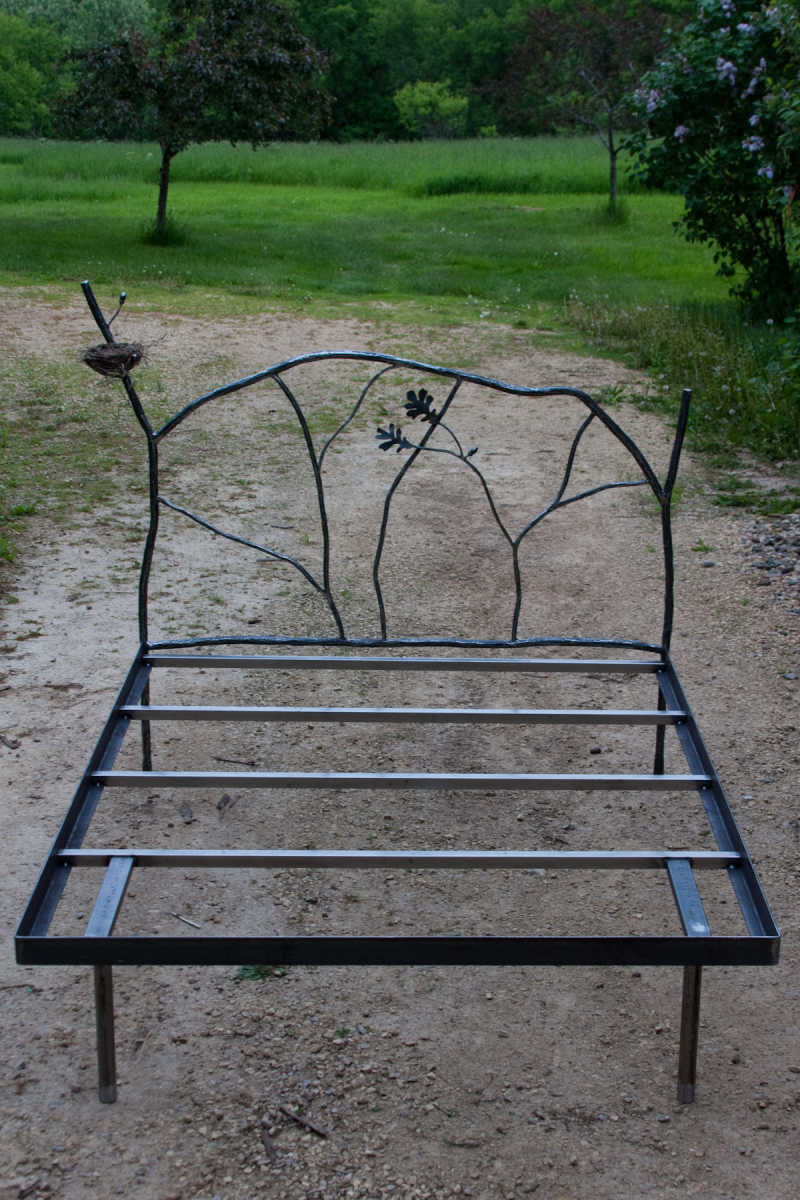
    <summary type="text/plain">This is a project from a few months back. It&apos;s a hand-forged steel bed for our bird-themed guest room. The nest is the one the robin left in the wreath above the garage at our old house. 


</summary>
    <author>
      <name>Hal Eckhart</name>
      <url>http://www.metalgeek.com</url>
      <email>hal@casaforge.com</email>
    </author>
    <dc:subject>Metal</dc:subject>
    <content type="text/html" mode="escaped" xml:lang="en" xml:base="http://www.metalgeek.com/">
      <![CDATA[This is a project from a few months back. It's a hand-forged steel bed for our bird-themed guest room. The nest is the one the robin left in the <a href="http://www.metalgeek.com/1391/sold_n.jpg">wreath above the garage</a> at our old house. 
<br /><br />
<a href="http://www.metalgeek.com/archives/images/birdbed1img_2929.jpg"><img src="http://www.metalgeek.com/archives/images/birdbed1img_2929_tn.jpg" alt="birdbed1img_2929_tn.jpg" width="233" height="350" /> </a>
<br /><br />
<a href="http://www.metalgeek.com/archives/images/birdbed2img_2979.jpg"><img src="http://www.metalgeek.com/archives/images/birdbed2img_2979_tn.jpg" alt="birdbed2img_2979_tn.jpg" width="350" height="233" /> </a>
<br /><br />
<a href="http://www.metalgeek.com/archives/images/birdbed3img_2946.jpg"><img src="http://www.metalgeek.com/archives/images/birdbed3img_2946_tn.jpg" alt="birdbed3img_2946_tn.jpg" width="233" height="350" /> </a>
<br /><br />

]]>
      
    </content>
  </entry>
  <entry>
    <title>Suitcase Fusion launch failure - fm core has been stopped</title>
    <link rel="alternate" type="text/html" href="http://www.metalgeek.com/archives/2011/04/21/000122.php" />
    <modified>2011-04-21T21:51:34Z</modified>
    <issued>2011-04-21T16:51:34-06:00</issued>
    <id>tag:www.metalgeek.com,2011://2.122</id>
    <created>2011-04-21T21:51:34Z</created>
    <summary type="text/plain">This is simply for future reference by me when I forget what I did to fix this the next time it happens. Or by you, if you google for a solution to this dilemma. This has happened more than once on our newish iMac running Snow Leopard, Extensis Suitcase Fusion 2, and of course QuarkXPress; the essential Mac layout program from hell, made by people who think that anyone dissatisfied with Quark&apos;s Mac commitment should &quot;switch to something else.&quot; In this case it wasn&apos;t a Quark bug, but apparently sloppy code somewhere by Extensis. Something in the cache gets corrupted, and poor Suitcase can&apos;t launch itself. It will tell you to start it manually from System Preferences, which also won&apos;t work.

The most straightforward way to fix this problem is to clean your caches, which can easily be done by installing the shareware program Snow Leopard Cache Cleaner and just run it. I selected all users and &quot;light cleaning&quot; which did the trick. Thanks Northern Softworks! You&apos;ve proved that some people in Alaska are actually not insane.

YMMV, but if it does, tell me about it.
</summary>
    <author>
      <name>Hal Eckhart</name>
      <url>http://www.metalgeek.com</url>
      <email>hal@casaforge.com</email>
    </author>
    <dc:subject>Code</dc:subject>
    <content type="text/html" mode="escaped" xml:lang="en" xml:base="http://www.metalgeek.com/">
      <![CDATA[This is simply for future reference by me when I forget what I did to fix this the next time it happens. Or by you, if you google for a solution to this dilemma. This has happened more than once on our newish iMac running Snow Leopard, <a href="http://www.extensis.com/en/products/suitcasefusion3/overview.jsp">Extensis Suitcase Fusion</a> 2, and of course <a href="http://en.wikipedia.org/wiki/QuarkXPress">QuarkXPress</a>; the essential Mac layout program from hell, made by people who think that anyone dissatisfied with Quark's Mac commitment should "switch to something else." In this case it wasn't a Quark bug, but apparently sloppy code somewhere by Extensis. Something in the cache gets corrupted, and poor Suitcase can't launch itself. It will tell you to start it manually from System Preferences, which also won't work.
<br /><br />
The most straightforward way to fix this problem is to clean your caches, which can easily be done by installing the shareware program <a href="http://www.northernsoftworks.com/snowleopardcachecleaner.html">Snow Leopard Cache Cleaner</a> and just run it. I selected all users and "light cleaning" which did the trick. Thanks Northern Softworks! You've proved that some people in Alaska are actually not insane.
<br /><br />
YMMV, but if it does, <a href="http://metalgeek.com/encoded.php">tell me about it</a>.
<br /><br />]]>
      
    </content>
  </entry>
  <entry>
    <title>Hand bending 1&quot; square 18 gauge steel tubing to a 4-1/2&quot; radius</title>
    <link rel="alternate" type="text/html" href="http://www.metalgeek.com/archives/2011/04/08/000121.php" />
    <modified>2011-04-09T04:12:39Z</modified>
    <issued>2011-04-08T23:12:39-06:00</issued>
    <id>tag:www.metalgeek.com,2011://2.121</id>
    <created>2011-04-09T04:12:39Z</created>
    <summary type="text/plain">The key to this jig is a piece of 1/8&quot; square wire, which is roughly centered on the outside of the jig. The wire could actually be round and anywhere from 1/8&quot; to 3/16&quot; for this job. The idea is to push the inside wall of the tubing in, and once it&apos;s going the right direction, it will take care of itself. Without the wire or something even more elaborate, you won&apos;t be able to bend this material tighter than about 15&quot; radius without kinking.


If you look closely, you might notice that the straight part of the tube that I&apos;m bending from ends up slightly curved also. If this is a problem, you can overbend the material slightly, and then carefully unbend the side that you used as a lever. But if it has to be perfect, then go buy a big expensive machine.


Oh, and doing this sort of thing is why I now have arthritis. And on that topic, the suggested youtube keywords to add are &quot;rage against your hands&quot;.


</summary>
    <author>
      <name>Hal Eckhart</name>
      <url>http://www.metalgeek.com</url>
      <email>hal@casaforge.com</email>
    </author>
    <dc:subject>Metal</dc:subject>
    <content type="text/html" mode="escaped" xml:lang="en" xml:base="http://www.metalgeek.com/">
      <![CDATA[The key to this jig is a piece of 1/8" square wire, which is roughly centered on the outside of the jig. The wire could actually be round and anywhere from 1/8" to 3/16" for this job. The idea is to push the inside wall of the tubing in, and once it's going the right direction, it will take care of itself. Without the wire or something even more elaborate, you won't be able to bend this material tighter than about 15" radius without kinking.
<br /><br />

If you look closely, you might notice that the straight part of the tube that I'm bending from ends up slightly curved also. If this is a problem, you can overbend the material slightly, and then carefully unbend the side that you used as a lever. But if it has to be perfect, then go buy a big expensive machine.
<br /><br />

Oh, and doing this sort of thing is why I now have arthritis. And on that topic, the suggested youtube keywords to add are "rage against your hands".

<br /><br />
<object type="application/x-shockwave-flash" style="width:425px; height:350px;" data="http://www.youtube.com/v/bjRlA4HxuyQ"><param name="movie" value="http://www.youtube.com/v/bjRlA4HxuyQ" /></object>
<br /><br />]]>
      
    </content>
  </entry>
  <entry>
    <title>Big aluminum walls</title>
    <link rel="alternate" type="text/html" href="http://www.metalgeek.com/archives/2011/03/03/000120.php" />
    <modified>2011-03-04T04:24:44Z</modified>
    <issued>2011-03-03T22:24:44-06:00</issued>
    <id>tag:www.metalgeek.com,2011://2.120</id>
    <created>2011-03-04T04:24:44Z</created>
    <summary type="text/plain">
Jackson Graham made these walls from 2&quot; square aluminum tube for a theater set using my tube-bending post from a long time back, and a few extra words of wisdom (hah!) from me. Nice job Jack!


</summary>
    <author>
      <name>Hal Eckhart</name>
      <url>http://www.metalgeek.com</url>
      <email>hal@casaforge.com</email>
    </author>
    <dc:subject>Metal</dc:subject>
    <content type="text/html" mode="escaped" xml:lang="en" xml:base="http://www.metalgeek.com/">
      <![CDATA[
Jackson Graham made these walls from 2" square aluminum tube for a theater set using my <a href="http://metalgeek.com/archives/2005/05/01/000047.php">tube-bending post</a> from a long time back, and a few extra words of wisdom (hah!) from me. Nice job Jack!

<br /><br />
<a href="http://www.metalgeek.com/archives/images/jackson1.jpg"><img src="http://www.metalgeek.com/archives/images/jackson1_tn.jpg" alt="jackson1_tn.jpg" width="350" height="263" /> </a>

<br /><br />

<a href="http://www.metalgeek.com/archives/images/jackson2.jpg"><img src="http://www.metalgeek.com/archives/images/jackson2_tn.jpg" alt="jackson2_tn.jpg" width="350" height="263" /> </a>

<br /><br />

<a href="http://www.metalgeek.com/archives/images/jackson3.jpg"><img src="http://www.metalgeek.com/archives/images/jackson3_tn.jpg" alt="jackson3_tn.jpg" width="263" height="350" /> </a>


<br /><br />]]>
      
    </content>
  </entry>
  <entry>
    <title>I bet you can&apos;t guess what I have in my hand</title>
    <link rel="alternate" type="text/html" href="http://www.metalgeek.com/archives/2011/02/28/000119.php" />
    <modified>2011-03-01T04:42:47Z</modified>
    <issued>2011-02-28T22:42:47-06:00</issued>
    <id>tag:www.metalgeek.com,2011://2.119</id>
    <created>2011-03-01T04:42:47Z</created>
    <summary type="text/plain">


I&apos;m still mostly clueless about what&apos;s wrong with me. Eleven days ago, my left wrist started swelling up and hurting like hell. It&apos;s been like that ever since. Six trips to the doctor, blood tests, a sonogram, an MRI, and nobody can identify a specific problem besides the fact that I&apos;m old and worn out. Among the many things that have been investigated and ruled out are Blood Clot, Lyme Disease, Lupus, Cellulitis, Rheumatoid arthritis, and Gout. Steroids and antibiotics haven&apos;t changed a thing, and neither oxycodone nor Aleve can lay a glove on the pain. My wrists have endured a lot of wear and tear over the years, so I&apos;m familiar with pain. But this pain is beyond anything I can remember.


One of the many weird things about this is the pain cycle. If I can sleep a little, the pain is almost nonexistent in the morning when I get up. It starts during the afternoon or early evening, and it&apos;s usually pretty bad by bedtime. If I can sleep a couple of hours, I&apos;m usually awakened by the pain by midnight to 1 AM and then in agony for a couple of hours. Sometime around 3, I usually doze off. By 7 AM the pain isn&apos;t so bad, and I start to think I&apos;m getting better. Then by late afternoon it starts all over again.


The nearest thing to a reason for all this is that my body just got fed up with the abuse and overreacted with a great big generalized inflammation. Time will tell.


I just today got a custom splint made and started using a TENS device. I have high hopes that I will finally start to heal.

</summary>
    <author>
      <name>Hal Eckhart</name>
      <url>http://www.metalgeek.com</url>
      <email>hal@casaforge.com</email>
    </author>
    <dc:subject>pain</dc:subject>
    <content type="text/html" mode="escaped" xml:lang="en" xml:base="http://www.metalgeek.com/">
      <![CDATA[<img src="http://www.metalgeek.com/archives/images/img_2336_tn.jpg" alt="img_2336_tn.jpg" width="350" height="233" />

<br /><br />

I'm still mostly clueless about what's wrong with me. Eleven days ago, my left wrist started swelling up and hurting like hell. It's been like that ever since. Six trips to the doctor, blood tests, a sonogram, an MRI, and nobody can identify a specific problem besides the fact that I'm old and worn out. Among the many things that have been investigated and ruled out are <a href="http://en.wikipedia.org/wiki/Thrombus">Blood Clot</a>, <a href="http://en.wikipedia.org/wiki/Lyme_disease">Lyme Disease</a>, <a href="http://en.wikipedia.org/wiki/Lupus">Lupus</a>, <a href="http://en.wikipedia.org/wiki/Cellulitis">Cellulitis</a>, <a href="http://en.wikipedia.org/wiki/Arthritis#Rheumatoid_arthritis">Rheumatoid arthritis</a>, and <a href="http://en.wikipedia.org/wiki/Gout">Gout</a>. Steroids and antibiotics haven't changed a thing, and neither oxycodone nor Aleve can lay a glove on the pain. My wrists have endured a lot of wear and tear over the years, so I'm familiar with pain. But this pain is beyond anything I can remember.
<br /><br />

One of the many weird things about this is the pain cycle. If I can sleep a little, the pain is almost nonexistent in the morning when I get up. It starts during the afternoon or early evening, and it's usually pretty bad by bedtime. If I can sleep a couple of hours, I'm usually awakened by the pain by midnight to 1 AM and then in agony for a couple of hours. Sometime around 3, I usually doze off. By 7 AM the pain isn't so bad, and I start to think I'm getting better. Then by late afternoon it starts all over again.
<br /><br />

The nearest thing to a reason for all this is that my body just got fed up with the abuse and overreacted with a great big generalized inflammation. Time will tell.
<br /><br />

I just today got a custom splint made and started using a <a href="http://en.wikipedia.org/wiki/Transcutaneous_electrical_nerve_stimulation">TENS</a> device. I have high hopes that I will finally start to heal.

<br /><br />]]>
      
    </content>
  </entry>
  <entry>
    <title>How to set up a LaserWriter 8500 for Mac OS X Snow Leopard</title>
    <link rel="alternate" type="text/html" href="http://www.metalgeek.com/archives/2011/01/13/000118.php" />
    <modified>2011-01-13T23:52:21Z</modified>
    <issued>2011-01-13T17:52:21-06:00</issued>
    <id>tag:www.metalgeek.com,2011://2.118</id>
    <created>2011-01-13T23:52:21Z</created>
    <summary type="text/plain"><![CDATA[The LaserWriter 8500 was a hell of a workhorse printer for desktop publishing about 12 years ago. Ours cost a couple of grand or so, and even generic toner isn't cheap, but one cartridge will print 14,000 pages. And it prints up to A3 paper (11.7 in x 16.5 in). Ours has well over 50,000 pages on it, and it's in fine shape despite the cat hair and fur balls inside every nook and cranny.


But it no longer functions in the latest version of OS X, as they've finally got rid of AppleTalk. So it will require a bit of elbow grease to get it up and running.


What I did to get it going worked for me, but it was enough trouble that it seemed that it might be helpful to document the process. Several parts of this ordeal worked unexpectedly, and the manual is both extremely out of date and some of the wording is ambiguous. 


One word of warning is that you won't be able to set some of the less critical defaults (like turning off the rather useless startup page) unless you're able to connect an OS 9 computer to the printer and run the printer setup utility. Yes, you heard right. OS freaking 9. If you have an old G4 and an OS 9 install CD that came with it, you can just boot off the CD and do what you need without installing the OS. It's hard to believe how quaint and fugly the Mac world was back then. Remember Conflict Catcher? 


Anyway, here's what worked for me.


To make this work, you'll need 3 bits of information to start. The MAC (machine) address, the IP address, and the printer name that was assigned when it was set up a long time ago. If you don't remember (like me) and you turned off the startup page, you'll have to return it to its default state. You do this by popping out the communication switch, turning printer off, turning it back on (wait for it to print the page) and then pop the switch back in. Unless you want to do this all again.


On the printed page, you'll see the MAC address (mine is 00:0E:3B:00:2A:1B). The IP address will be 0.0.0.0 which doesn't do anyone any good, so it will have to be changed. And the name still needs to be set to get it to work under Snow Leopard.


Now you need to determine a permanent IP address for the printer; one that's accessible on your network, but one that won't be overwritten by your router or server or whatever that controls DHCP for your network. I chose 192.168.1.145 because it's far enough away (on this home network) from everything else that there's no chance it will conflict with another IP.


Make up a name for your printer. Don't use spaces or funky characters to play it safe. I thought lw_8500 was a nice plain vanilla printer name.


Add these two items to your /etc/hosts file in the form of 


IP_address (space) printer_name

like this:


192.168.1.145 lw_8500


hosts is owned by root, so edit it something like this in a terminal window:


sudo nano /etc/hosts


and then enter your password when it asks for it.


Nano is a little funky if you're not used to terminal appications, but take your time and it will be fine.


Scroll down to the bottom of the text.

Enter 


192.168.1.145 lw_8500


(or whatever you've come up with) on a new line.

Press ctrl-o to write write the file.

Enter to save.

ctrl-x to quit.


The next step is to type this into a terminal window to force an entry into your system’s arp table (whatever the hell that means):


arp -s hostname printer_Ethernet_address


such as:


sudo arp -s 192.168.1.145 08:00:07:64:d1:a4


(enter Mac user password)

Then, to assign the IP address to the printer, you simply ping the printer name:


ping printer_IP_name

like this:


ping lw_8500


(after it successfully pings the printer, press ctrl-c to end)


You can set a few preferences by telnetting in to the printer like this:


telnet lw_8500


and then enter your password (or set one).


That's it for the terminal stuff. Of course, the printer won't be recognized like a normal modern device. That would be too damn easy! So try this:


Go to the Print &amp; Fax preference pane, and click the plus button. 

Go to the IP tab.

Select Line Printer Deamon - LPD.

Enter 192.168.1.145 in the address field.

Enter lpd://lw_8500/ in the location field.

For driver, select Apple LaserWriter 8500 v3010.103

And add.


Happy Printing!


* Postscript:
The 8500 is still working, but there seems to be a battery somewhere that's dead or a loose connection, so it keeps losing the configuration data and has to be reprogrammed every week or two. This means that I have to run through all the steps from pinging the printer and down. I'll update this if I figure that out.


]]></summary>
    <author>
      <name>Hal Eckhart</name>
      <url>http://www.metalgeek.com</url>
      <email>hal@casaforge.com</email>
    </author>
    <dc:subject>Code</dc:subject>
    <content type="text/html" mode="escaped" xml:lang="en" xml:base="http://www.metalgeek.com/">
      <![CDATA[The <a href="http://en.wikipedia.org/wiki/LaserWriter_8500">LaserWriter 8500</a> was a hell of a workhorse printer for desktop publishing about 12 years ago. Ours cost a couple of grand or so, and even generic toner isn't cheap, but one cartridge will print 14,000 pages. And it prints up to A3 paper (11.7 in x 16.5 in). Ours has well over 50,000 pages on it, and it's in fine shape despite the cat hair and fur balls inside every nook and cranny.
<br />
<br />
But it no longer functions in the latest version of OS X, as they've finally got rid of <a href="http://en.wikipedia.org/wiki/AppleTalk">AppleTalk</a>. So it will require a bit of elbow grease to get it up and running.
<br />
<br />
What I did to get it going worked for me, but it was enough trouble that it seemed that it might be helpful to document the process. Several parts of this ordeal worked unexpectedly, and the manual is both extremely out of date and some of the wording is ambiguous. 
<br />
<br />
One word of warning is that you won't be able to set some of the less critical defaults (like turning off the rather useless startup page) unless you're able to connect an OS 9 computer to the printer and run the printer setup utility. Yes, you heard right. OS freaking 9. If you have an old G4 and an OS 9 install CD that came with it, you can just boot off the CD and do what you need without installing the OS. It's hard to believe how quaint and fugly the Mac world was back then. Remember Conflict Catcher? 
<br />
<br />
Anyway, here's what worked for me.
<br />
<br />
To make this work, you'll need 3 bits of information to start. The MAC (machine) address, the IP address, and the printer name that was assigned when it was set up a long time ago. If you don't remember (like me) and you turned off the startup page, you'll have to return it to its default state. You do this by popping out the communication switch, turning printer off, turning it back on (wait for it to print the page) and then pop the switch back in. Unless you want to do this all again.
<br />
<br />
On the printed page, you'll see the MAC address (mine is 00:0E:3B:00:2A:1B). The IP address will be 0.0.0.0 which doesn't do anyone any good, so it will have to be changed. And the name still needs to be set to get it to work under Snow Leopard.
<br />
<br />
Now you need to determine a permanent IP address for the printer; one that's accessible on your network, but one that won't be overwritten by your router or server or whatever that controls DHCP for your network. I chose 192.168.1.145 because it's far enough away (on this home network) from everything else that there's no chance it will conflict with another IP.
<br />
<br />
Make up a name for your printer. Don't use spaces or funky characters to play it safe. I thought lw_8500 was a nice plain vanilla printer name.
<br />
<br />
Add these two items to your /etc/hosts file in the form of 
<br />
<br />
IP_address (space) printer_name
<br />
like this:
<br />
<br />
<code>192.168.1.145 lw_8500</code>
<br />
<br />
hosts is owned by root, so edit it something like this in a terminal window:
<br />
<br />
<code>sudo nano /etc/hosts</code>
<br />
<br />
and then enter your password when it asks for it.
<br />
<br />
Nano is a little funky if you're not used to terminal appications, but take your time and it will be fine.
<br />
<br />
Scroll down to the bottom of the text.
<br />
Enter 
<br />
<br />
<code>192.168.1.145 lw_8500</code>
<br />
<br />
(or whatever you've come up with) on a new line.
<br />
Press ctrl-o to write write the file.
<br />
Enter to save.
<br />
ctrl-x to quit.
<br />
<br />
The next step is to type this into a terminal window to force an entry into your system’s arp table (whatever the hell that means):
<br />
<br />
arp -s hostname printer_Ethernet_address
<br />
<br />
such as:
<br />
<br />
<code>sudo arp -s 192.168.1.145 08:00:07:64:d1:a4</code>
<br />
<br />
(enter Mac user password)
<br />
Then, to assign the IP address to the printer, you simply ping the printer name:
<br />
<br />
ping printer_IP_name
<br />
like this:
<br />
<br />
<code>ping lw_8500</code>
<br />
<br />
(after it successfully pings the printer, press ctrl-c to end)
<br />
<br />
You can set a few preferences by <a href="http://en.wikipedia.org/wiki/Telnet">telnetting</a> in to the printer like this:
<br />
<br />
<code>telnet lw_8500</code>
<br />
<br />
and then enter your password (or set one).
<br />
<br />
That's it for the terminal stuff. Of course, the printer won't be recognized like a normal modern device. That would be too damn easy! So try this:
<br />
<br />
Go to the Print &amp; Fax preference pane, and click the plus button. 
<br />
Go to the IP tab.
<br />
Select Line Printer Deamon - LPD.
<br />
Enter 192.168.1.145 in the address field.
<br />
Enter lpd://lw_8500/ in the location field.
<br />
For driver, select Apple LaserWriter 8500 v3010.103
<br />
And add.
<br />
<br />
Happy Printing!
<br />
<br />
* Postscript:<br />
The 8500 is still working, but there seems to be a battery somewhere that's dead or a loose connection, so it keeps losing the configuration data and has to be reprogrammed every week or two. This means that I have to run through all the steps from pinging the printer and down. I'll update this if I figure that out.


<br /><br />]]>
      
    </content>
  </entry>
  <entry>
    <title>Lazarus Video</title>
    <link rel="alternate" type="text/html" href="http://www.metalgeek.com/archives/2011/01/01/000117.php" />
    <modified>2011-01-02T00:19:53Z</modified>
    <issued>2011-01-01T18:19:53-06:00</issued>
    <id>tag:www.metalgeek.com,2011://2.117</id>
    <created>2011-01-02T00:19:53Z</created>
    <summary type="text/plain">

My beloved but infrequently used and ancient Flip Mino video camera quit functioning after sitting dormant for several months. The white charging light kept flashing, but it wouldn&apos;t turn on or even mount the drive so that I could access the videos stored on it. I tried resetting it numerous times, and charged it on several different USB connections for over 2 weeks, but still no joy in Mudville.

Flip&apos;s tech support was beyond useless. They didn&apos;t even actually read my questions, but instead gave me several bizarre and increasingly complicated reset instructions, none of which worked. Oh well, time to pull out my spudger. 

iFixit has some Flip repair guides and teardowns posted, but none of them were exactly my model. However, after reading someone else&apos;s comment and following this teardown for a MinoHD, the fix was surprisingly simple. All I really had to do was open the case, loosen and get behind the logic board, unplug and replug the board and then put it back together. It then booted up fine and the battery was even charged!

Thanks, iFixit!


</summary>
    <author>
      <name>Hal Eckhart</name>
      <url>http://www.metalgeek.com</url>
      <email>hal@casaforge.com</email>
    </author>
    <dc:subject>Cleverness</dc:subject>
    <content type="text/html" mode="escaped" xml:lang="en" xml:base="http://www.metalgeek.com/">
      <![CDATA[<img src="http://www.metalgeek.com/archives/images/flip.gif" alt="flip.gif" width="350" height="233" />
<br /><br />
My beloved but infrequently used and ancient <a href="http://tinyurl.com/37wq2va">Flip</a> Mino video camera quit functioning after sitting dormant for several months. The white charging light kept flashing, but it wouldn't turn on or even mount the drive so that I could access the videos stored on it. I tried resetting it numerous times, and charged it on several different USB connections for over 2 weeks, but still no joy in Mudville.
<br /><br />
Flip's tech support was beyond useless. They didn't even actually read my questions, but instead gave me several bizarre and increasingly complicated reset instructions, none of which worked. Oh well, time to pull out my <a href="http://tinyurl.com/2a28pn9">spudger</a>. 
<br /><br />
<a href="http://www.ifixit.com/">iFixit</a> has some Flip repair guides and teardowns posted, but none of them were exactly my model. However, after reading someone else's <a href="http://www.ifixit.com/Answers/View/15620/My+Flip+Mino+Doesnt+power+on#answer22792">comment</a> and following this <a href="http://www.ifixit.com/Teardown/Flip-MinoHD-Teardown/2030/1">teardown</a> for a MinoHD, the fix was surprisingly simple. All I really had to do was open the case, loosen and get behind the logic board, unplug and replug the board and then put it back together. It then booted up fine and the battery was even charged!
<br /><br />
Thanks, iFixit!
<br /><br />

]]>
      
    </content>
  </entry>
  <entry>
    <title>How to make a functional Amazon Associates link from generated &quot;link to this page&quot; code that will actually validate</title>
    <link rel="alternate" type="text/html" href="http://www.metalgeek.com/archives/2010/11/30/000116.php" />
    <modified>2010-11-30T13:53:29Z</modified>
    <issued>2010-11-30T07:53:29-06:00</issued>
    <id>tag:www.metalgeek.com,2010://2.116</id>
    <created>2010-11-30T13:53:29Z</created>
    <summary type="text/plain"><![CDATA[I like to run blog posts through the W3C Validator. It catches a few errors and typos that may cause trouble down the line. But some auto-generated code can cause the validator to throw so many errors that it's difficult to see what I need to fix. Amazon Associates' link generator is something that has frustrated me plenty for the few times I've used it. Just inserting one link on a previously valid page will throw 10 errors and 15 warnings. But I think I've found a solution.

First, I want to make a couple of things perfectly clear. (A) I'm only posting this because I've figured it out twice, and couldn't find the answer on the internets when I forgot what I learned the first time and (B) yes, I realize it's only a cheatey little hack that just tricks the validator, but I don't care. Amazon will do what they do, and I don't really feel like wasting time researching the issue when Amazon obviously doesn't care about clean code. Plus, I want to make sure I make a little money when someone buys stuff because I made a well reasoned and insightful argument as to why they should.

The following assumes that you know something about both Amazon Associates and html. If not, go learn about them and come back later.

In brief, the answer to this dilemma is to use TinyURL. That's it, problem solved. For details, keep reading.

When I signed up for the Amazon Associates program a couple of years ago, I was encouraged to install their little toolbar in my browser. This toolbar has a purportedly helpful button that allows you to create a link to whatever Amazon page you are currently on. This link has your id code attached to it, so you'll get paid if someone visits the link and then buys the merchandise on the page.


The only problem with this method is that the rather ugly generated code will cause so many errors in the validator that it becomes a huge mess to sort out. I tried for a while to get the code to validate, but I couldn't get both the validator and Amazon's link checker to both work at the same time. However, both are happy if I just replace the target url with the TinyURL equivalent. In other words, translate the contents of the url within the first set of quotation marks after &lt;a href= and you're good to go. 

Let me know if you don't follow my reasoning here. It wouldn't be the first time I've been a bit obtuse.

]]></summary>
    <author>
      <name>Hal Eckhart</name>
      <url>http://www.metalgeek.com</url>
      <email>hal@casaforge.com</email>
    </author>
    <dc:subject>Code</dc:subject>
    <content type="text/html" mode="escaped" xml:lang="en" xml:base="http://www.metalgeek.com/">
      <![CDATA[I like to run blog posts through the <a href="http://validator.w3.org/">W3C Validator</a>. It catches a few errors and typos that may cause trouble down the line. But some auto-generated code can cause the validator to throw so many errors that it's difficult to see what I need to fix. Amazon Associates' link generator is something that has frustrated me plenty for the few times I've used it. Just inserting one link on a previously valid page will throw 10 errors and 15 warnings. But I think I've found a solution.
<br /><br />
First, I want to make a couple of things perfectly clear. (A) I'm only posting this because I've figured it out twice, and couldn't find the answer on the internets when I forgot what I learned the first time and (B) yes, I realize it's only a cheatey little hack that just tricks the validator, but I don't care. Amazon will do what they do, and I don't really feel like wasting time researching the issue when Amazon obviously doesn't care about clean code. Plus, I want to make sure I make a little money when someone buys stuff because I made a well reasoned and insightful argument as to why they should.
<br /><br />
The following assumes that you know something about both Amazon Associates and html. If not, go learn about them and come back later.
<br /><br />
In brief, the answer to this dilemma is to use <a href="http://tinyurl.com">TinyURL</a>. That's it, problem solved. For details, keep reading.
<br /><br />
When I signed up for the Amazon Associates program a couple of years ago, I was encouraged to install their little toolbar in my browser. This toolbar has a purportedly helpful button that allows you to create a link to whatever Amazon page you are currently on. This link has your id code attached to it, so you'll get paid if someone visits the link and then buys <a href="http://tinyurl.com/2f37yov">the merchandise</a> on the page.

<br /><br />
The only problem with this method is that the rather ugly generated code will cause so many errors in the validator that it becomes a huge mess to sort out. I tried for a while to get the code to validate, but I couldn't get both the validator and Amazon's link checker to both work at the same time. However, both are happy if I just replace the target url with the TinyURL equivalent. In other words, translate the contents of the url within the first set of quotation marks after <strong>&lt;a href=</strong> and you're good to go. 
<br /><br />
<a href="http://www.metalgeek.com/encoded.php">Let me know</a> if you don't follow my reasoning here. It wouldn't be the first time I've been a bit obtuse.

<br /><br />]]>
      
    </content>
  </entry>
  <entry>
    <title>Maiden Rock sunrise timelapse </title>
    <link rel="alternate" type="text/html" href="http://www.metalgeek.com/archives/2010/11/04/000115.php" />
    <modified>2010-11-05T03:48:56Z</modified>
    <issued>2010-11-04T22:48:56-06:00</issued>
    <id>tag:www.metalgeek.com,2010://2.115</id>
    <created>2010-11-05T03:48:56Z</created>
    <summary type="text/plain">


I&apos;ve been taking a lot of sunrise and sunset pictures up here because we&apos;ve usually got a great view of both. I finally got my Cannon 40d back from repairs, so I can once again use my cheesy Yongnuo interval timer to capture a stream of time-lapse images. 

I used MEncoder to process the resulting folder of images after resizing them with an imagemagick convert shell script:


#!/bin/sh
for file; do
/opt/local/bin/convert -scale 1280 -shave 0x66 -scale 1280x720! &quot;$file&quot; &quot;$file&quot;;
mv &quot;$file&quot; `echo &quot;$file&quot; | sed &quot;s/\ /_/g&quot; | tr [:upper:] [:lower:]` ;
done


And then:


mencoder &quot;mf://*.jpg&quot; -vf scale=1280:720 -o timelapse.avi -of lavf -ovc lavc
-lavcopts vcodec=mjpeg -lavfopts 
i_certify_that_my_video_stream_does_not_use_b_frames


This turned an 850 MB folder of images at 3:2 into a 12.6 MB avi at 4:3 and YouTube turned that into a 3 MB mp4. My attempts at just using mencoder to turn it into an mp4 didn&apos;t come out quite as well, but I really have little idea what I&apos;m doing. As usual.

By the way, I&apos;m finding it amusing that almost any reference to our little town of Maiden Rock and YouTube thinks you&apos;re talking about Iron Maiden.   

</summary>
    <author>
      <name>Hal Eckhart</name>
      <url>http://www.metalgeek.com</url>
      <email>hal@casaforge.com</email>
    </author>
    <dc:subject>Photos</dc:subject>
    <content type="text/html" mode="escaped" xml:lang="en" xml:base="http://www.metalgeek.com/">
      <![CDATA[<object type="application/x-shockwave-flash" style="width:425px; height:350px;" data="http://www.youtube.com/v/TG4qQ_pRIEE"><param name="movie" value="http://www.youtube.com/v/TG4qQ_pRIEE" /></object>
<br /><br />

I've been taking a lot of sunrise and sunset pictures up here because we've usually got a great view of both. I finally got my <a href="http://tinyurl.com/2vqz7sj">Cannon 40d</a> back from repairs, so I can once again use my cheesy Yongnuo interval timer to capture a stream of time-lapse images. 
<br /><br />
I used <a href="http://en.wikipedia.org/wiki/MEncoder">MEncoder</a> to process the resulting folder of images after resizing them with an <a href="http://www.imagemagick.org/">imagemagick</a> <a href="http://www.imagemagick.org/script/convert.php">convert</a> shell script:
<br />
<pre><code>
#!/bin/sh
for file; do
/opt/local/bin/convert -scale 1280 -shave 0x66 -scale 1280x720! "$file" "$file";
mv "$file" `echo "$file" | sed "s/\ /_/g" | tr [:upper:] [:lower:]` ;
done
</code></pre>

<br />

And then:
<br />

<pre><code>
mencoder "mf://*.jpg" -vf scale=1280:720 -o timelapse.avi -of lavf -ovc lavc
-lavcopts vcodec=mjpeg -lavfopts 
i_certify_that_my_video_stream_does_not_use_b_frames
</code></pre>
<br />

This turned an 850 MB folder of images at 3:2 into a 12.6 MB avi at 4:3 and YouTube turned that into a 3 MB mp4. My attempts at just using mencoder to turn it into an mp4 didn't come out quite as well, but I really have little idea what I'm doing. As usual.
<br /><br />
By the way, I'm finding it amusing that almost any reference to our little town of Maiden Rock and YouTube thinks you're talking about <a href="http://tinyurl.com/29ttz84">Iron Maiden</a>.   
<br /><br />
]]>
      
    </content>
  </entry>
  <entry>
    <title>666 Alarm Habañero Salsa</title>
    <link rel="alternate" type="text/html" href="http://www.metalgeek.com/archives/2010/09/12/000114.php" />
    <modified>2010-09-13T03:21:54Z</modified>
    <issued>2010-09-12T22:21:54-06:00</issued>
    <id>tag:www.metalgeek.com,2010://2.114</id>
    <created>2010-09-13T03:21:54Z</created>
    <summary type="text/plain">This one is absurdly, stupidly hot. I did a taste test with El Yucateco, and this one is not only hotter, but it&apos;s much more pleasant. It amplifies the fruitiess of the habañero and has a rapid but not instantaneous burn that grows until you wonder what the hell you were thinking and where did I put the fire extinguisher. 


Needless to say, I really like it. 
 
Previous warnings apply. Do not attempt if you can&apos;t take a little pain. Or a lot. 
 
Ingredients: 

	40 habañero chiles, stems removed, cut in half 
	One cup thick and pulpy homemade apple juice 
	The juice of 6 limes 
	One medium tomato, coarsly chopped 
	One teaspoon salt
	Two tablespoons sugar


Combine everything and cook, stirring gently to boiling. Simmer 15 minutes. Process with a food mill. Heat to boiling again and process for storage by whatever method you like. I pressure canned mine, but whatever. 
 
Yields 3 cups plus a bit 
 
 
 </summary>
    <author>
      <name>Hal Eckhart</name>
      <url>http://www.metalgeek.com</url>
      <email>hal@casaforge.com</email>
    </author>
    <dc:subject>Cooking</dc:subject>
    <content type="text/html" mode="escaped" xml:lang="en" xml:base="http://www.metalgeek.com/">
      <![CDATA[This one is absurdly, stupidly hot. I did a taste test with <a href="http://www.elyucateco.com/">El Yucateco</a>, and this one is not only hotter, but it's much more pleasant. It amplifies the fruitiess of the habañero and has a rapid but not instantaneous burn that grows until you wonder what the hell you were thinking and where did I put the fire extinguisher. 
<br /> 
<br /> 
<a href="http://www.metalgeek.com/archives/images/habanero.jpg"><img src="http://www.metalgeek.com/archives/images/habanero_tn.jpg" alt="habanero-2_tn.jpg" width="350" height="233" /> </a>
<br /> 
<br /> 
Needless to say, I really like it.<br /> 
<br /> 
Previous warnings apply. Do not attempt if you can't take a little pain. Or a lot.<br /> 
<br /> 
Ingredients:<br /> 
<ul>
	<li>40 habañero chiles, stems removed, cut in half<br /> </li>
	<li>One cup thick and pulpy homemade apple juice<br /> </li>
	<li>The juice of 6 limes<br /> </li>
	<li>One medium tomato, coarsly chopped<br /> </li>
	<li>One teaspoon salt<br /></li>
	<li>Two tablespoons sugar<br /></li>
</ul>

Combine everything and cook, stirring gently to boiling. Simmer 15 minutes. Process with a food mill. Heat to boiling again and process for storage by whatever method you like. I pressure canned mine, but whatever.<br /> 
<br /> 
Yields 3 cups plus a bit<br /> 
<br /> 
<a href="http://www.metalgeek.com/archives/images/habanero.jpg"><img src="http://www.metalgeek.com/archives/images/habanero_cooking_tn.jpg" alt="habanero_cooking_tn.jpg" width="350" height="233" /> </a>
<br /> ]]>
      
    </content>
  </entry>

</feed>